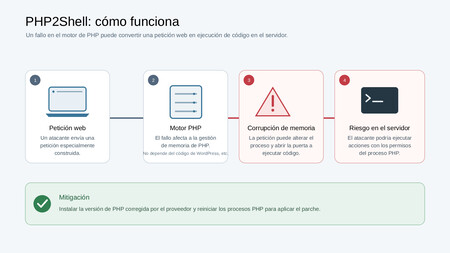
If you have a website, chances are it runs on PHP. This programming language is behind a large part of the web, including WordPress, Wikipedia, public administration and government websites, and many online stores. Two critical bugs were found this week, so it’s worth checking that your site isn’t vulnerable and that all relevant fixes have already been applied.
A cyber security scam
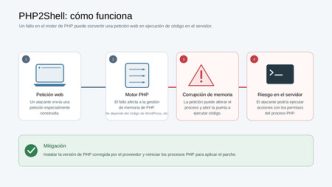
The PHP project released an emergency security patch on Wednesday, October 21. It fixes two vulnerabilities registered as CVE-2026-109618 and CVE-2026-109619, both classified as critical and both allowing remote code execution. Thus, an attacker who exploits this vulnerability could execute his own commands on a server that uses PHP and gain access to control and/or sensitive information. The bugs are named “PHP2Shell”.
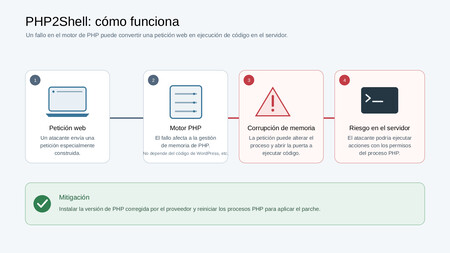
Cybersecurity company Qualys says the vulnerability can be exploited without logging in, so it’s all important. Cloudflare also reported the attack They have already taken advantage of this vulnerability Hours before the patch was released, researchers confirmed remote code execution against Magento 2.4.9 (an open source e-commerce platform) and ten other PHP applications. Now that the details are public, it’s worth being cautious, as it’s expected that this vulnerability will continue to be exploited
Know which version of PHP you need
Permanent versions are listed by PHP branch. From Qualys they list them as 8.5.12, 8.4.27, 8.3.36 and 8.2.35. Basically your PHP is patched if it is at or above the number associated with its branch.
Older versions are a big problem. PHP 8.1 and earlier no longer receive updates from the PHP project, so they should be considered vulnerable unless a distribution or third-party support provider committed to updating the integration adapts the fixes. If you find yourself in one of these versions, It would be best to consult your supplier. About a supported update.
Find out what works for your site
If you use shared hosting or have WordPress:
- Log in to your CMS (cPanel, Plesk, or your provider’s own panel).
- Look for a section that says something like “PHP Version,” “MultiPHP Manager,” or “Software.”
- Note the full version number, such as 8.3.36, not just “8.3”.
Many providers only show branches. If so, this is the best thing you can do to get well Ask support If they applied for amendment on 21 October.
If you manage your own server, run php -v Your site may use a different version of PHP from the command line in a terminal, so also check which version your web server is actually using. There is a temporary page It may also display this, but it’s a good idea to delete that page immediately and as soon as you read it, as it reveals details about your server and attackers can use automatic scanners to find exactly these exposed files.
Don’t panic if the number seems old
Linux distributions usually patch security holes without changing the version number. This means a server can look old and still be secure. then, It would be a good idea to consult your provider’s security notice. Or your package manager’s change log to see the two CVE numbers that refer to the patched vulnerabilities.
Security company Sansec also noted that servers that installed PHP from the common Remy repository on RHEL-based systems did not have a fix available on October 21. Most packages already have updates available so you can check them and apply patches
Check if your provider has already done this
Many providers take care of this for you, so if you’re not familiar with the terminology or are a system administrator and you have WordPress, You probably have to patch the vulnerability. Major hosting sites have all versions of PHP patched so customers don’t need to do anything. Some have temporarily disabled a PHP setting on all servers until the patch is ready, as a precaution.
Depending on the hosting provider you use, look for and check any advertisements about PHP on the Internet. And if you have questions, the best thing you can always do is contact their support directly and ask.
just in case, It doesn’t hurt to make a backup Before making any changes to your files and your database. Nowadays it is also advisable to be alert for unknown files, new administrator users, unexplained traffic spikes, etc. and keep an eye out for signs of problems. If you suspect a breach, contact your supplier or the person responsible for managing your system.
Cover image PHP.earth
In Xataka | Microsoft considers that “frontier models are not credible” and that AI agents must be considered an insider threat