
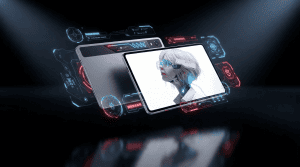
So Red Magic has pretty much perfected the gaming tablet with this here Astra 2, which significantly upgrades and improves the original Red Magic tablet in many ways. You got boosted performance, some snazzy liquid cooling tech, even better battery life, a brighter display, and of course the usual sassy virtual AI assistant thing.
Anyway, I’ve been playing with the Red Magic Astra 2 these past couple of weeks. Here’s what I reckon, because if you couldn’t already tell, I rather like it a lot. And for more of the latest and greatest tech, please do poke subscribe, ding that notifications bell. Cheers.
Specifications
| Spec | Red Magic Astra 2 |
|---|---|
| Display | 9.06 inch OLED, 2.4K resolution, 185Hz refresh rate |
| Chipset | Qualcomm Snapdragon 8 Elite Gen 5 |
| RAM | 16GB (review unit) |
| Storage | 512GB, no microSD support |
| Battery | 8300mAh |
| Charging | 75W wired, dual ports, bypass charge mode |
| Cooling | Liquid cooling with vapor chamber |
| Rear Camera | 4K video |
| Front Camera | 1080p video |
| Audio | Stereo speakers, DTS:X Ultra, Bluetooth, no headphone jack |
| OS | Red Magic OS 11 (Android-based) |
Design & Build Quality
So first up, the design of the Red Magic Astra 2 tablet hasn’t changed up too much from the original. It’s still a compact nine-ish inch, meaty old slab, not too chunky mercifully. And if I’m wearing some of my baggier shorts, can just about squeeze it into a pocket like so.
It’s certainly got a pretty good heft to it, that’s for sure, but still comfortable to clutch for a good few hours at a time. It’s completely flat screen of course, and not particularly thick bezels surrounding it. Just thick enough so your hand flesh doesn’t intrude on that display when you are scrolling about and bugger up the responsiveness. And just thick enough so that selfie camera can be squirreled away in that top bezel so you don’t have any horrible notch or selfie cam orifice intruding on the action.
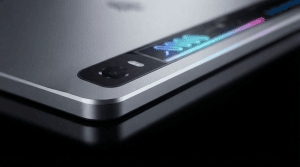
And once again, you’ve got a solid and good-looking full metal jacket finish. This stretches all the way around the edges to that back end. And it’s a matte finish with just this glossy strip up top. So thankfully it doesn’t get all grubby and fingerprinty, just needs the occasional wee bit of spit and polish to keep it looking box fresh. And I really appreciate how that back end is completely flat. There’s no sticking out camera lenses or other bits, so absolutely zero jiggle if this thing is just sat on a desk.
And naturally it wouldn’t be a Red Magic device without an obligatory bit of RGB action. It’s not just the Red Magic branding here that lights up, but also the cooling strip. And this is fully customizable of course within the Red Magic Astra 2’s settings. So you can deactivate it if you want, you can have it turning off automatically if the battery is particularly low. You can have it flash for notifications and the like. You’ve got full customization over the actual color of the thing as well.
Software & User Experience
Now when you’re clutching the Red Magic Astra 2 in landscape mode like so, the power buttons are over on the left edge and it does have a built-in fingerprint sensor. So just a quick tap of your digit to that pad and you’re pretty much straight in. It’s given me absolutely no gyp these past couple of weeks. Highly reliable, never fails on me and super responsive.
And once you’re in there, as usual it’s a bit of Red Magic OS version 11. And as usual this serves up a mostly stock Android vibe with some stylized fonts and theming to make it feel a bit more gamey. You’ve got a respectable amount of customization in here and of course some extra bonus bits like the Mora digital assistant. But otherwise Red Magic hasn’t tinkered too much with that general Android vibe. You do have a wee bit of crapware unfortunately stuffed on here, including Ali Express and some random games. Thankfully you can delete all that easily enough.
And the good news is my tablet came with 512 gigs of storage space, which is just as well when the likes of Wuthering Waves takes up 50 gigs plus by its bloody self. Now sadly, bugger all support for micro SD memory cards to expand that storage if you need to.
Gaming Features
| Game | Settings | Target Frame Rate | Result |
|---|---|---|---|
| Wuthering Waves | Highest graphics | 60fps | Near-flawless, minor dips to high 50s over hours of play |
| Call of Duty Mobile | Very high graphics | 165fps | Locked at 165fps, zero fluctuation |
Now as before, when it’s time to get stuck into a game, what you’ll want to do is flip the old magic key which is bright red to help it stand out. You’ll have fast access to all of your installed games, in-depth game settings, manual performance controls, GPU settings and more. This is also where you’ll find Mora.
Anyway, none of that has really changed over the previous Red Magic Astra tablet. Same as the smartphones as well. And when you’re actually in a game as well, if you swipe twice from either the left or the right side, you’ll yank out the old Red Magic gaming dashboard. This again has all the features we know and love including performance profiles, RAM optimization, brightness controls, screen recording and additional gaming tools.
Performance & Cooling
But anyway, on to the all-important subject of performance. And the Red Magic Astra 2 tablet is powered by the Qualcomm Snapdragon 8 Elite Gen 5. One of the absolute beefiest platforms around, and a step up from the original Snapdragon 8 Elite chipset of that first tablet. And that is backed here in my review model by a rather healthy 16 gigs of RAM.
As usual, I downloaded and installed all 50 bloody gigs of Wuthering Waves. One of the more demanding Android titles. I ran it here on the Astra 2 tablet on the highest graphics settings at 60 frames per second just to see if it could cope alright. It delivered an excellent experience, with only the occasional dip into the high 50 FPS range after hours of gameplay. Likewise, Call of Duty Mobile ran flawlessly at very high graphics settings with a stable 165 FPS throughout testing.
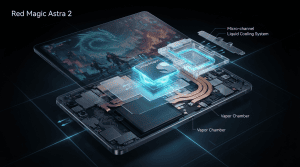
And of course, it’s not just the performance that’s been upgraded for the Astra 2. You’ve also now got that fresh bit of liquid cooling tech stuffed in there. It replaces the fan entirely while still using a large vapour chamber to help dissipate heat. The cooling system can be activated manually or automatically whenever a game launches. Throughout testing, the tablet stayed cool where your hands grip it and showed no signs of thermal throttling, even during long gaming sessions.
Display
The Astra 2 gaming tablet sports another 9 inch OLED screen, or 9.06 inches to be absolutely precise, with a 2.4K resolution. Even though it’s quite a spacious panel, visuals remain impressively sharp.
Red Magic has also boosted the brightness this generation, making outdoor visibility much better than before. The refresh rate now reaches 185Hz for an even smoother gaming experience.
Audio
On top volume, those speakers are suitably loud with a respectable amount of bass. Games like Call of Duty sound punchy, and you still get a convincing stereo effect despite the edge-mounted speakers.
Bluetooth audio performs well with minimal latency. Unfortunately there’s no headphone jack, although wired audio is still possible through a USB-C adapter. DTS X Ultra support is also included.
Battery & Charging
When we’re talking about the battery capacity, it is only a slight increase over the previous model, with an 8,300mAh battery replacing the earlier 8,200mAh unit.
However, real-world battery life sees a significant improvement. During testing with Wuthering Waves running at maximum settings in Rise Mode, the Astra 2 lasted just over five and a half hours compared to roughly four and a quarter hours on the previous model.
You’ve also got 75W wired charging support together with bypass charging, allowing power to go directly to the system while gaming to reduce heat. Dual USB-C charging ports also make it easier to find a comfortable gaming setup while plugged in.
Cameras
As mentioned before, you do have a selfie camera housed in the slim top bezel. It records at up to Full HD resolution with basic stabilization, making it suitable for video calls or casual streaming.
On the rear there’s also a 4K-capable camera, although camera quality is unlikely to be a deciding factor for anyone buying a dedicated gaming tablet.