Virtually everyone has a cell phone in their pocket. And over the years, many video game companies, development studios and publishers have sought to turn it into a gaming machine. Mobile gaming has evolved tremendously since its inception, but being able to play my PC games from my mobile has always been a thorn in my side.
Streaming satisfies that need, but while we’ve already found systems that work really well and are very stable, like GeForce NOW for cloud gaming, or Apollo Streaming + Moonlight Client for playing games on your PC, ultimately you’ll always rely on an internet connection.
Well, playing your PC games from your mobile phone and completely locally is now a reality, and the DroidDeck project was born precisely with that intention. We tell you how it works and how you can run your Steam games from an Android mobile.
That’s what it is. DroidDeck installs like any other Android app, but inside it runs the ARM version of Steam in Big Picture mode, providing a very similar experience to Steam Deck. You log in with your Steam account, access your library, and download games directly to your phone.
The app includes Steam input adjustments for playing with any controller, overlay options to track game performance, management of your GPU drivers, and even frame generation options. Apart from all this, the app also supports a desktop mode and you can also install Linux apps via Flatpak and AppImage. It’s basically like having SteamOS but without changing your mobile operating system, and all from one app.
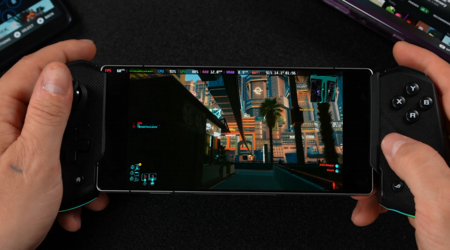
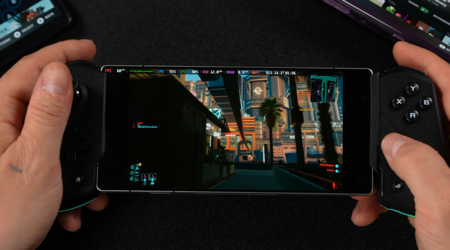
Cyberpunk 2077 running on a RedMagic 11 Pro at medium settings and a stable 60 fps
What’s special about it?. There are already other apps that play PC games natively on Android, such as GameNative, Winlator or GameHub. The difference with DroidDeck is that it offers Valve’s own client and interface instead of a custom launcher. And that’s pretty cool, especially if Steam is your main platform and you enjoy its ecosystem.
How it works. Windows games run through Proton, Valve’s compatibility layer, while a translation layer called FEX converts x86 code, for which PC games are built, into instructions that ARM processors understand. The project is actually based on Valve’s Steam Frame virtual reality glasses, glasses with mobile chips that play PC games without being tethered. It’s the same approach but geared towards mobile phones. So now we can say that it is worth having a gaming mobile.
performance. The most interesting thing is that the statistics are not bad for a project that has just started. ETA PRIME, YouTube’s content creator, tested the app on its Redmagic 11 Pro, a mobile phone with a Snapdragon 8 Elite Gen 5 chip and 16 GB of RAM. All games run at 720p:
- Cyberpunk 2077: About 60 fps on medium settings.
- Skyrim Special Edition: About 60 fps on medium settings.
- Left 4 Dead 2: Stable 120 fps on high settings.
- Hogwarts Legacy: Around 48fps at medium settings, going above 60fps with built-in FSR frame generation enabled.

requirement. DroidDeck requires Android 9 or higher. You also need an Adreno 730 GPU or higher chip, which is a GPU built on Qualcomm chips. Right now, if your phone has Mali, Xclipse, PowerVR or Adreno 710 GPU, you cannot play the game. In practice, this means Snapdragon 8 Gen 1 chips and above. Once you have the app, you’ll need to install Linux, which takes up about 3GB, and more than 1GB extra if you want the desktop environment and emulator.
Your phone’s hardware will be particularly important here, as it will determine how well the game plays. ETA Prime adds that these chips heat up quickly when running x86 games and recommends disabling one or two CPU cores to keep performance stable over time.
How to install DroidDeck. Installation is easy. You need to download the APK from the project’s GitHub page (enabling installation of applications from unknown sources). Running Steam also requires enabling developer options and disabling Android’s child-process restrictions It can be found in the same Android Developer Options menu.
The bad thing is if you have Android 13 or lower, you might not find that option, so you have to pull ADB commands to disable it.
and what now. DroidDeck is still in its infancy, but it’s one of many projects already circulating on the Internet that make it easy to install PC games on compatible mobile phones. It has just begun, and everything indicates that when the compatibility between games and Arm architecture will mature more, little by little we will see how mobile phones will become, this time for real, portable consoles that run everything.
Picture | ETA Prime
In Xataka | We finally have the launch trailer for ‘GTA VI’ and it’s every bit as spectacular as you’d expect