You delete hundreds of photos and videos from gallery and your Android still shows no space. This is normal and may not be the gallery’s fault. Mobile phone use creates temporary files of applications and videos received through messaging, as well as downloaded content and files you may have forgotten to view without an Internet connection.
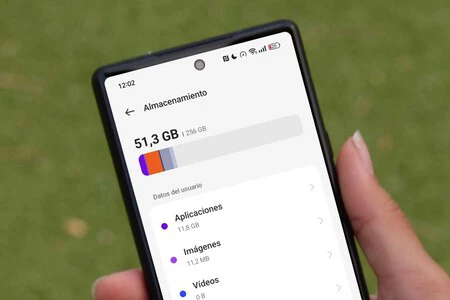
Where to start? Settings > StorageWhere, according to Google’s help, you must select a category to see how much it takes (that menu differs depending on each manufacturer). There you can see how many applications and multimedia files are taken separately, without doing anything.
Please note that Deleting photos may not free up space immediately. Deleted content may remain in the Gallery Trash until a certain period of time has passed and it is permanently deleted. Google Photos Trash, for example, stores items for 30 days, and if you empty the Trash, they’ll be deleted soon after, and once emptied, they can’t be retrieved. So, empty the trash too.
Applications store temporary files or caches to improve their performance. For example, Spotify clearly admits (in its help center) that it caches some music and podcasts in mobile memory in addition to downloaded files for offline listening. You should probably clear the cache, as it stores temporary data (the app may take a little longer to open). This is done in the mobile settings menu in the information of each application; The route differs depending on the terminal manufacturer.
Messaging: WhatsApp and Telegram
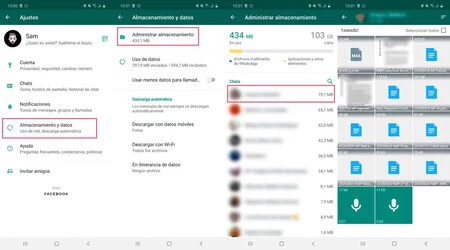
Messaging apps are usually the most likely to accumulate data. In the case of WhatsApp, there is a built-in tool called “Manage Storage” (in Settings > Storage & Data), which shows how much space the app takes up and analyzes large or forwarded files, sorted by size and filtered to see files larger than 5 MB (according to the WhatsApp Help Center). Anything deleted in this way will disappear from the application forever and only for you; And if you have multiple copies of that file on your phone, you’ll need to find them to free up space
If it’s a WhatsApp group that’s taking up a lot of space, instead of deleting the entire group, just open the conversation and tap the group name at the top, Where Manage Storage will appear (or delete only multimedia files and not messages). We described five steps to clean WhatsApp and in the same month, we also described how to free up 70 GB of chats after exporting to a computer or an external hard drive with detailed steps for iPhone.
Telegram allows you to clear cache of multimedia files from within the application. In Settings > Data & Storage > Storage UsageThere is an option to clear the cache of personal chats, groups and channels, with the possibility of excluding specific chats, as explained by the service in December 2022: you can delete everything downloaded in the application and, later, download it again from the Telegram cloud.
Offline games and downloads
Great games can have cheats. The space requirement to install the game does not reflect the current size of the game, nor does the space requirement indicate whether the game will download additional data. According to the Android developer documentation, there are games where the installation size is small, but later downloads additional data and downloads several gigabytes of games.

The same goes for media files downloaded for temporary storage: for example, Netflix Help describes how to delete any downloads from the download list or, in the settings under My Netflix, to delete all downloads.
Cleaning and storage equipment
D Download folder It’s a great storer of files you’ve forgotten about, such as: PDFs, compressed files, and others saved years ago and taking up space. I suggest you check it out yourself.
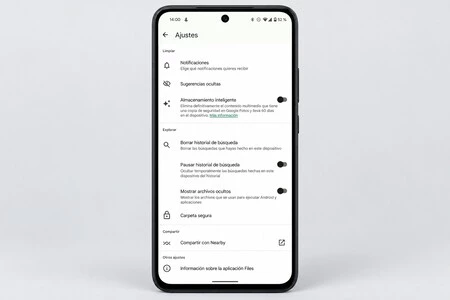
For anything else, there’s a Google app called File by Google. in you Menu > ClearJunk Card (according to Google Help Center) deletes temporary data from apps without touching their settings; However, what’s deleted is lost forever, while the Duplicate Files option (from the same Help Center) marks a copy as the original and suggests keeping it on Google.
he Android Smart Storage Enable it to delete photos and videos backed up to your Google account Settings > Storage > Free up space.
The following instructions can help you organize your work.: First, settings to know where you are wasting space; Second, the applications that take up the most space and their cache; Messages, downloaded items for offline viewing, download folder and trash with gallery photos in that order. Deleting hundreds of photos can be a wasted effort if the weight is in a few heavily used applications.
When it’s an application that takes up a lot of space on your mobile and you rarely use one or any function, there are alternatives. Application archive. The Android Help Center describes that when you save an app, the system removes software and permissions, deletes temporary files, and turns off notifications but keeps icons and data.

This is done in In Settings > Apps, select an app and tap Archive; To reactivate the app icon, tap the icon on your home screen; However, the app must be available on the respective app store. Google warns that some of these steps will only be available on Android 15 or later
Picture | With the Xataka version