It started quietly and has become the norm when it comes to sending money to colleagues. Because who does not have Bijum? It’s almost as ubiquitous as WhatsApp: Bizum has 31.5 million users. And slowly it is colonizing the missing space of the platform: physical payments in stores. I have been paying with Bizum for over a month and I think it can replace the rest of the mobile wallets
Bijum Pe, that is the name of the invention. It’s like paying normally with your mobile phone, only the money goes between the customer’s account and the merchant’s account without going through the card network. Neither Visa nor MasterCard, which is why Bizum payments represent a real change in Europe. Now, a prior process is required. The confusion starts from here.
There are two ways to configure Bizum payments
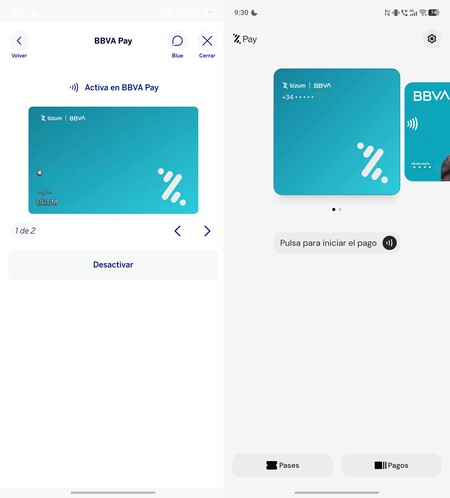
Left, Payment via Bizum on Bank App (BBVA); Ok, Bijum Pay
Bring the phone’s NFC closer to the dataphone to make payments in physical transactions. For them to work, you must have payments configured with Bizum on your mobile and Businesses must support their payment terminals. From here, the process is normal: the platform transfers between accounts without charging a fee from your bank. They may charge a percentage from the store, it all depends on the status of your bank.
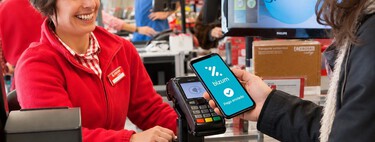
Paying with Bizum is as easy as paying with any mobile card. Setting up payment is another story, as it can be done in two ways:
- Physical Payment with Bizum from Bank App. There are banks that have enabled this method of payment without using other applications like BBVA. Open your banking app, go to the Bizum section and check if there is an option to pay with Bizum. Activate it and that’s it.
- Physical payment through Bizum Pay app. This is the platform’s own application, a generic wallet where you can pay not only with Bizum, but also with your bank card. This is the most comfortable way to use these payments and the one I recommend
I downloaded the Bizum Pay app and configured it with my Bizum account. The process is simple, as you just need to open the application and Type the mobile number associated with Bijum. If the bank has already enabled the payment, Bizum Pay completes the setup. Today, the app works with CaixaBank, Sabadell, Unicaja, Caja Rural, Bankinter, Ibercaja, Grupo Cooperativo Cajamar, Abanca, Arquia Banca, Colonya Caixa Pollença and ING.
Strategy: Secondary cards
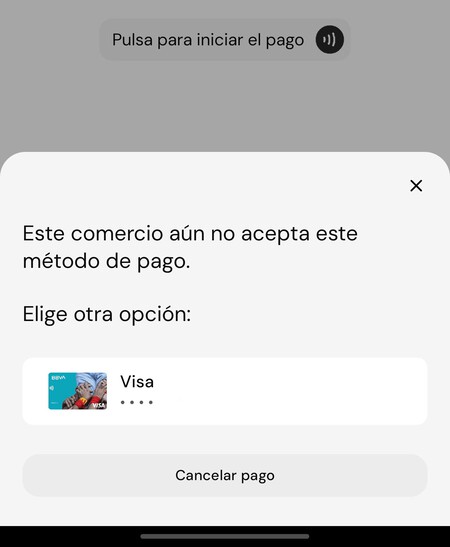
If the business does not yet accept payment through Bizum, the Bizum Pay app offers you to pay with a registered card.
Bizum Payment is not yet widely available in stores. From my personal experience, cardless payments still have a long way to go, although banks and stores have stepped up in recent weeks. Since paying with Bijum in Bijum Pay app is a lottery, this wallet Let’s add some cards Linked to the user’s bank account.
Bizum Pay is a wallet app like Google Wallet or Apple Wallet. Allows you to register contactless Bizum payments, plus other cards. If the store is not ready, You can switch to a regular card without the app. Something that, today, you are going to do often.
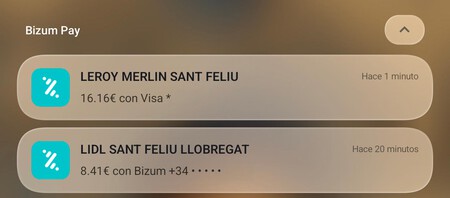
Payment differences from the same Bizum Pay app: Lidl accepts Biu, Leroy Merlín does not. Store support is improved
The process is as follows:
- The cashier scans the shopping items and transfers the bill to the dataphone.
- You must unlock the mobile phone configured with Bizum Pay (on the iPhone, press the side button twice) and bring it close to the dataphone. If you haven’t added it as default wallet on your mobile (which I recommend), open Bizum Pay manually.
- Dataphone will recognize the Bizum account as a payment method and collect the amount by transferring money from your bank account to the merchant account.
- Is the store still not accepting payments with Bizum? If you want to switch to the card, the screen will say Bizum Pay. Mobile phones should be brought back closer to data phones..
Register a card as a secondary payment in Bizum Pay Ensures that you can use the application as a means of paymentBecause if the store’s card machine does not accept payment with Bizum, it must accept regular card payments. The problem is that the cashier sees the payment as canceled and has to send the account back to Dataphone, something that slows down collection. If Bizum is accepted on the first try, no more problems.
If the business accepts payment via Bizum, the process is the same as paying by card: just bring your mobile phone close to the dataphone.
This is not a 100% Spanish solution
As an experience, paying with Bizum is the same as paying with a card: Users don’t appreciate anything different. Anything that goes below the transaction represents change. A huge one: Bizum Payments is a solution that does not use the platforms of the two American giants, Visa and MasterCard. What payment does Spanish sovereignty mean? not at all
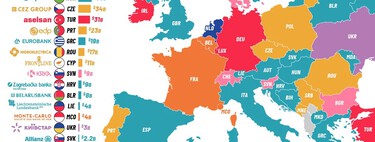
I contacted Bizum to check if their mobile payments are entirely their own without American technology. It’s like this for the most part, with one detail that still depends: how the dataphone is identified when you interact with the mobile phone via NFC.
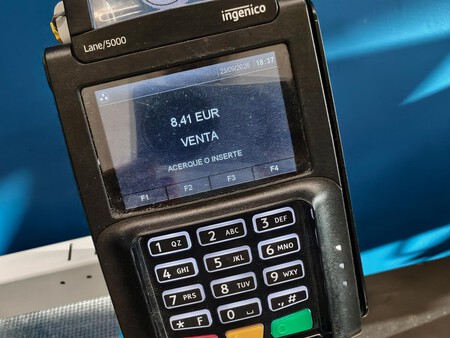
Dataphone is compatible with Bizum Pay. You don’t know until you try it: There’s usually nothing that sets it apart
As Bijum explained to me:
“We do not use any Visa or MasterCard technology to pay based on an instant SEPA transfer from an account at Bizum. We use an EMV part from another provider that is already available at terminals in Spain and Andorra, thanks to an agreement between the entity and the brand.”
“This allows the user’s identifier to be tokenized, i.e., the phone with which they are registered in Bizum, so that it can be accepted by existing terminals and then create an account-to-account transaction in the Bizum ecosystem, as happens with other uses.”
The EMV standard, short for Europay, Mastercard and Visa, allows cards to be securely authorized on dataphones to proceed with banking transactions. Today it is managed by EMVCo, a company controlled by Visa, MasterCard and four other card networks This is a standard widely used around the world and found in most Spanish dataphones. This is why Bizum chose it: it makes it easier to set up payments faster.
Mobile phones have a lot to say
And a miracle can happen: the store accepts payments with Bizum and you can pay without a card.
Besides EMV, there’s a second, less talked about dependency: the phone itself. Android is from Google and iOS is from Apple, and They decide which apps can use NFC to make payments. On the iPhone, Bizum Pay is only possible because the European Commission forced Apple to open the chip to other wallets.
Does Bijum Pay replace the rest of the wallets? You can do that, though today you get it thanks to secondary cards, which cover every gap left by Bizum. The day stores accept it for the first time, payments with your mobile will no longer go through the Visa and MasterCard networks without us noticing. It is not 100% sovereignBut what’s most important: money follows the path.
And the next step already has a date. Bizum signed an agreement in February with Wero, MB Way, Bancomat and Vipps MobilePay to connect their systems: payments in stores in other countries will come in 2027. Paying for coffee in Lisbon or Paris with Bizum, that would be a huge change
Cover image Edited by Ivan Linares
In Xataka | Treasury confirms it: Payments for your friends’ dinners and gifts through Bizum do not go to the tax agency