
A Christmas panorama of hardware launches is quite orphaned, with big names in the sector trying to shake their pockets a bit with offers, rehashes, redesigns and various offers. This points to a rather low gift season, where games won’t be particularly bright, so welcome news like this Xbox Nano, a smaller controller that lacks some of the qualities of its bigger brothers but offers portability, design and other advantages in return.
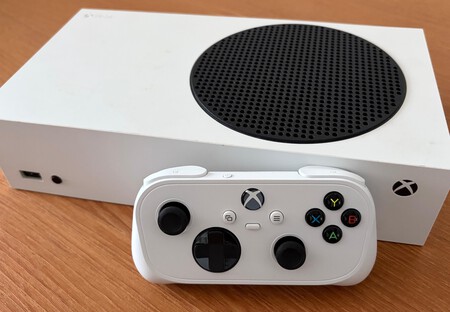
The first impression when you pick up the Xbox Nano and weigh it is predictable: “It’s going to be too small for me.” And as a person who is two meters tall and has hands that require heavy, wide control with a good grip area, I wrinkled my nose the first time I held the controller. However, that’s a feeling that quickly dissipates: As you can see in the comparison images, the Nano is slightly narrower than a traditional Xbox controller, and the proportions and spacing between the sticks, D-pad and buttons are very similar.

Of course, there are disadvantages with large hands, especially on the grips in the rear area, which are much smaller than usual, which leaves it closer to an eighties console controller (albeit larger, of course) than a traditional controller. It gives off an annoying wobble when resting on a surface. Aesthetic details that make its main problem unavoidable: while it’s not as uncomfortable as one might first think, it’s less comfortable than a traditional controller.
But is it comfortable?
After hours of play, the first impression is confirmed, and also qualified: it is a controller that In my particular case and as a player with large hands, it will not replace traditional. For certain games it fulfills its tasks perfectly (the feeling of solidity is perfect despite the size), but not so much for long sessions, especially in genres that require a certain precision in combos or direct, frantic keystrokes as may be the case. beat them up Classic cut.
Its small size has obvious advantages (it is very easy to transport, even in the very small box with which the controller is sold and which can be used to protect it in transport without adding extra volume). But one more drawback: the Nano doesn’t vibrate because there was no place to put the motor, so if you need a tickling feeling in your fingers while you play, this controller is definitely not for you.
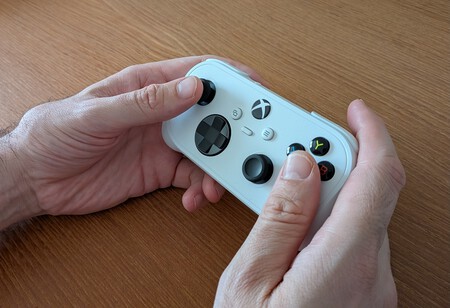
Arguably the worst detail of the controller I’ve saved for last, and here we run into another design problem: the buttons on the front are too close together. Going from the T trigger to the front B triggers on a traditional controller doesn’t require much dexterity, but the size of the buttons themselves makes the change difficult here, although a small step is cleverly designed when transitioning from one to the other that makes it easier to identify which button is being pressed (since the dimensions of the triggers are small again, considering). Again we are faced with a but that must be relative depending on the game: There are titles that don’t even use fronts, so it will depend on the use they are given.

Apart from the size
And then… everything else: the Xbox Nano is a full-fledged Xbox controller, that is, an extraordinary controller with intuitive and fully responsive use (again, yes, with sticks and buttons that are millimeters shorter than its older brothers, although this is, in fact, something that does not affect light use). The crosshead is the same size as a traditional controller (again, thinking of traditional games). The design, with that retro look of the square controls of yesteryear, feels like an ergonomically more elaborate version of the NES and SNES (in fact, if you want a direct comparison, you have it on the SNES controller that Nintendo sells for the Switch), and that could mean an extra pleasant nostalgic charge for many users, including myself.
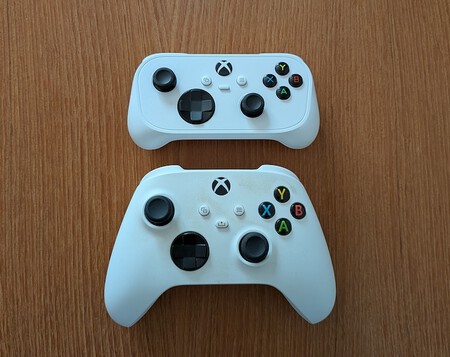
Some other issues that should be taken into account: it does not have a headphone jack, the batteries are not removable (authorized sources say about 35 hours of use), which reduces the potential useful life of the peripheral, and it only charges via USB-C, not compatible with existing charging bases at the moment. As with any command, Use Xbox Wireless with Xbox consoles and Bluetooth with PC, Android, iOS and Smart TVs The Nano may be small in size, but it’s definitely not a controller with too many cutouts.
One non-negotiable advantage of the Nano is its price: 15 euros less than a typical wireless controller (49.99 euros vs. 64.99). It’s a great option to have an extra controller, and also a perfect first purchase for a young gamer taking their first steps with Xbox. An excellent option, in short, if you are a certain type of player: and considering the efforts that Microsoft has recently made to appeal to a wider audience and remove barriers to entry to access its ecosystem, this seems like a good move.
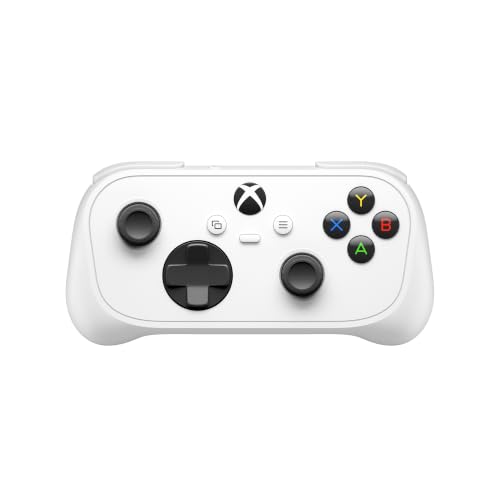
Xbox Controller Nano – Compatible, PC, Mobile Devices and more
Prices may vary. We earn commission from these links
In Xataka | There’s only one way for the new Xbox Helix not to cost between $1,200 and $1,800, and that’s for Microsoft to sell at a loss.