With the advent of intelligence in smart TVs have come controls that require a master’s degree if you want to fully understand them. I guess that’s why they put in direct buttons for Netflix and company, to make apps easier. The problem is that we don’t all use the same platform, so we end up with one part of the controller becomes useless.
I have an LG TV with webOS and a Google TV Streamer with Google TV (Android TV with Cape). Both controls have buttons I don’t normally use, although the second one has one added that is customizable. Since I want the controller to do what I want, I asked Claude to start: “Can you help me change the application that opens buttons I don’t need?” And there he went, to change them.
Not all TVs left
Searching the net for Claude TV to personalize
Depending on the operating system of the television or player, changing the buttons will be more or less easy. even Warranty may apply. Continuing with my devices, Google TV/Android TV is easily customizable, this is not true of webOS (although it is possible to use remote numbers). Samsung TVs with Tizen make it even harder.
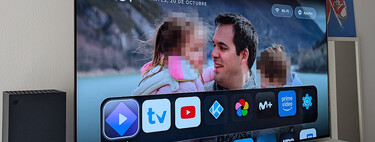
I chose Claude as my assistant and the installation of his app on my computer. After presenting my idea to him, he analyzed all the possibilities and came up with a plan:
- I’ll start with Google TV Streamer, which allows relatively easy customization of buttons (besides that, as standard, its remote comes with a configurable button).
- I had to enable developer mode in the player and wireless adb. This is the easiest step.
- Cloud will create a lightweight app to customize the specific button on the controller. Button Remapper lets you do this, but it’s a somewhat heavy app that adds a lot more functions to the configuration. Functions like buttons on my controller, I don’t need.
- The app needed accessibility permissions to patch button actions.
Claude describes the process step by step while waiting for OK. I had an idea Change the YouTube button to run Movistar PlusWhich is my second most used app after Netflix.
A simple process is not without risk
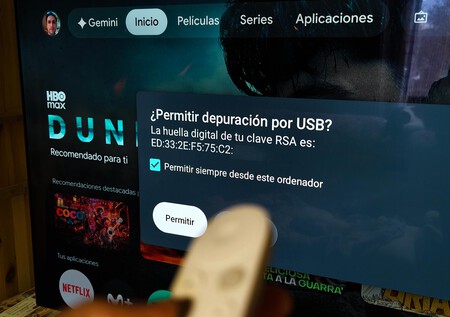
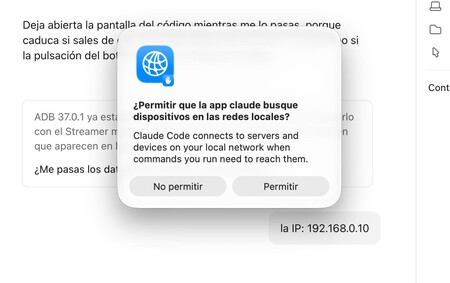
By managing ADB from the cloud computer, I accepted the permission on the TV
With wireless ADB on the computer, and Claude, the AI can connect to the Google TV and perform the necessary actions. I didn’t bother too much with the initial prompt:
“Can you connect the remote button to the TV to launch Movistar Plus instead of YouTube?”
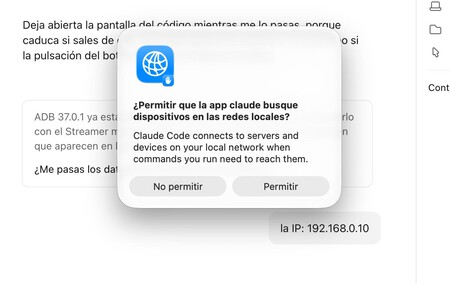
Claude tracked down my local network, detected the streamer, connected via ADB and, after accepting the connection with the TV remote, he automated the entire process. It asked me for permission to download platform-tools, capture the button event, download the programming environment, and develop the app. which he later installed.
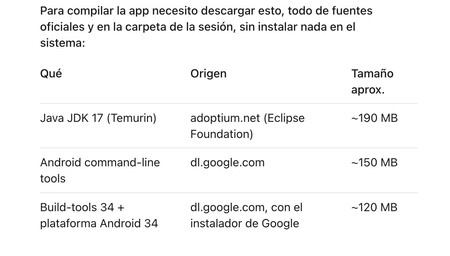
Downloaded the Android Development Environment to build cloud custom apps
Total Time: About ten minutes.
The process was simple, though I think Claude needed too many files To create a shortcut to change the way a button works (such as shooting a fly with a cannonball). The fact is that it works perfectly: now, every time I press the YouTube button, the app that opens is Movistar Plus. Without losing the customizable button on the Google TV Streamer remote, since I configured it from the start with Disney+. This is easily reversed: you just need to uninstall the application created by Claude.
Allowing an AI tool to modify itself can cause your device to stop working. Keep this in mind before starting any process
Television is an example for the rest
The process was much simpler and more practical than the Button Remapper app. And it should work for any TV or player including Android TV/Google TV. Claude also offers support for changing buttons on other systems like webOS, but LG doesn’t make it as easy (it’s even worse with Samsung). This is possible with LG’s developer mode or, more in-depth, root and homebrew channels (recent firmwares don’t allow this on almost any model. Rooting may void warranty.
If AI changes the rules when it comes to big hacks, it’s also a great help at the home level. For example, to remove unwanted applications from an Android mobile, or to create an application for a home automation device that has lost its support. If you have imagination, AI can help you.
Cover image Ivan Linares
In Xataka | Someone has achieved what seemed impossible: a Redmi Note 12 running iOS. With Claude’s help of course.